
🚀 Finding the Best Playwright Locators in Seconds with Codegen
Use Playwright Codegen and the Inspector to generate stable locators automatically and speed up your automation workflow.

When I first started learning Playwright, I spent far too much time trying to find the “perfect” locator. I would inspect elements, experiment with CSS selectors, and constantly fix tests that broke after small UI changes. Then I discovered Playwright Codegen. Suddenly, finding stable locators became almost effortless. In this article, I’ll show you how to use Codegen and the Playwright Inspector to generate reliable locators in seconds.
👉 Playwright Codegen
Codegen can automatically generate recommended locators while you interact with your application.
In this article, you’ll learn how to use Playwright Codegen + Inspector to discover the best locator in seconds.
What is Playwright Codegen?
Codegen is a Playwright tool that:
Opens a browser
Records your interactions
Generates Playwright test code automatically
Suggests the best locator strategy
Instead of manually searching the DOM, Playwright analyzes the page and recommends locators like:
getByRole()getByLabel()getByText()getByPlaceholder()
These are user-facing locators, which are more stable than raw CSS selectors.
Step 1 — Run Playwright Codegen
Run this command in your terminal:
npx playwright codegen http://localhost:4200Playwright will:
Open a browser
Launch the Playwright Inspector
Start generating code as you interact with the page
You’ll see something like this:
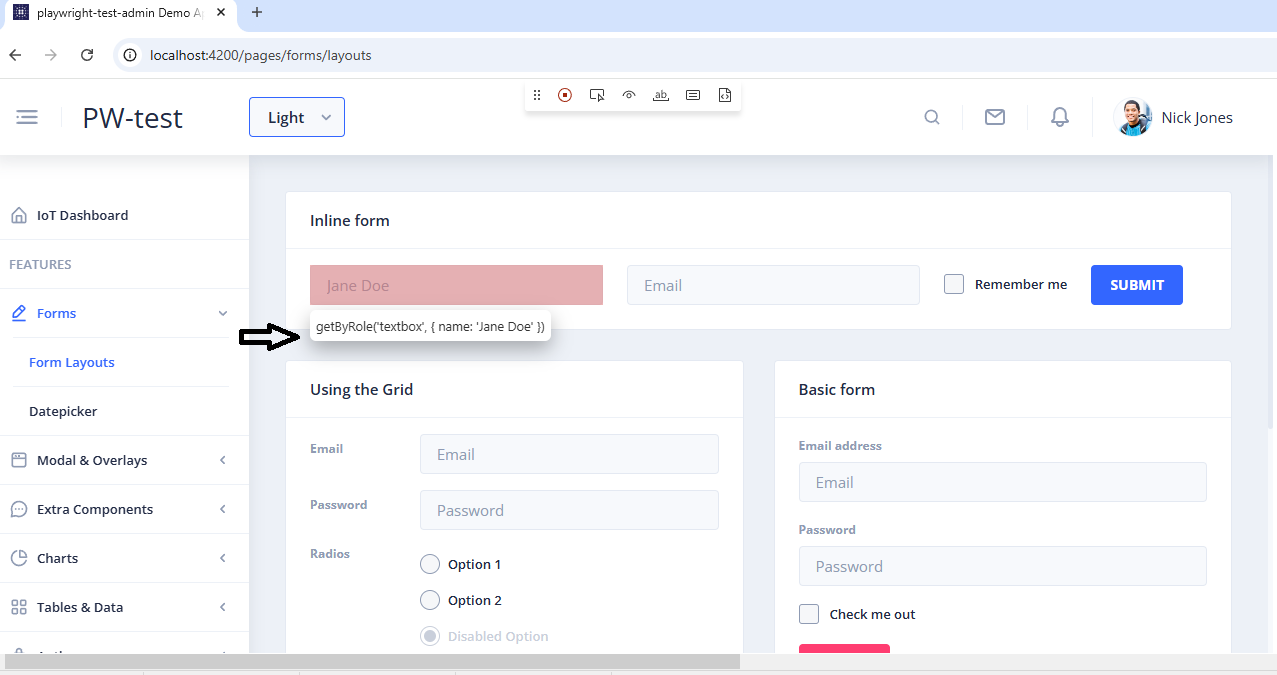
await page.getByRole('textbox', { name: 'Email' }).click();
await page.getByRole('textbox', { name: 'Email' }).fill('denis@email.com');
await page.getByRole('button', { name: 'Login' }).click();
Notice something important here:
Playwright prefers:
getByRole
getByLabel
getByText
These locators are based on how users see the interface, not on fragile DOM structures.
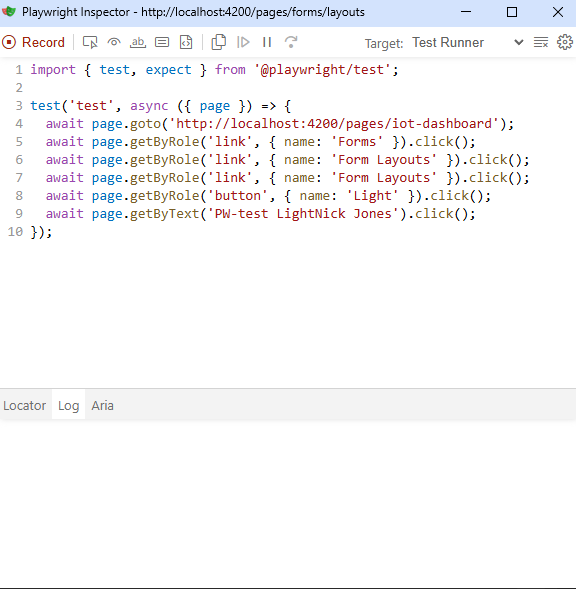
Step 2 — Click Elements to Generate Code
Once Codegen is running:
Click inside the browser window
Interact with your application normally
Playwright will generate test code automatically
Example interaction:
Click email field
Type email
Click login button
await page.getByRole('textbox', { name: 'Email' }).fill('denis@email.com');
await page.getByRole('button', { name: 'Login' }).click();
This code can be copied directly into your test files.
Step 3 — Understand the Locator Strategy
Playwright follows a locator hierarchy when generating selectors.
Best → Worst
getByRole()
getByLabel()
getByPlaceholder()
getByText()
getByTestId()
CSS locator()
XPath
This is why Codegen rarely generates something like:
page.locator("div:nth-child(3) > button")Those selectors are fragile and break easily.
Step 4 — Refine Locators with the Inspector
While Codegen is running, you also have access to the Playwright Inspector.
The Inspector allows you to:
Pick elements visually
Highlight matched elements
See how many elements match a locator
Debug tests interactively
For example, if a locator matches multiple elements, the Inspector will show something like:
3 elements matchedThis immediately tells you the locator is too broad.
Example: Improving a Locator
Bad locator:
await page.locator("input").first().fill("test@email.com");Why this is problematic:
It depends on DOM order
If another input appears, the test breaks
Better locator:
await page.getByLabel("Email").fill("test@email.com");Now the test is clearer and more stable.
Debugging Tip: Use the Playwright Inspector
You can also pause your tests and inspect locators interactively.
Add this line to your test:
await page.pause();Then run:
npx playwright test --headedThe Playwright Inspector opens, letting you:
select elements
test locators
refine selectors quickly
Why Codegen is So Powerful
Codegen is extremely useful because it:
✔ saves time
✔ suggests stable locators
✔ teaches best practices automatically
✔ helps beginners learn Playwright faster
Many automation engineers use Codegen as a starting point for writing tests.
Final Thoughts
Writing stable locators is one of the most important skills in automation testing.
Instead of manually guessing selectors, use Playwright Codegen to generate reliable locators in seconds.
The workflow becomes simple:
Run Codegen
↓
Interact with your app
↓
Copy generated locators
↓
Refine if necessary
With this approach, you’ll spend less time debugging locators and more time building meaningful tests.
Writing good automation tests isn’t just about tools—it’s about choosing the right techniques. Locator strategy is one of the biggest reasons tests become fragile over time. By using Playwright Codegen and the Inspector, you can immediately discover stable locators and build more reliable tests from the start.
If you’re learning Playwright or working in QA automation, I’ll continue sharing practical tips like this—things that save time and improve test stability.
Subscribe if you’d like more guides on Playwright, automation testing, and modern QA workflows.
Happy testing 🚀