
Mastering Playwright Locators: The Syntax Rules Every QA Should Know
How understanding locator syntax can make your automated tests more reliable and easier to maintain.

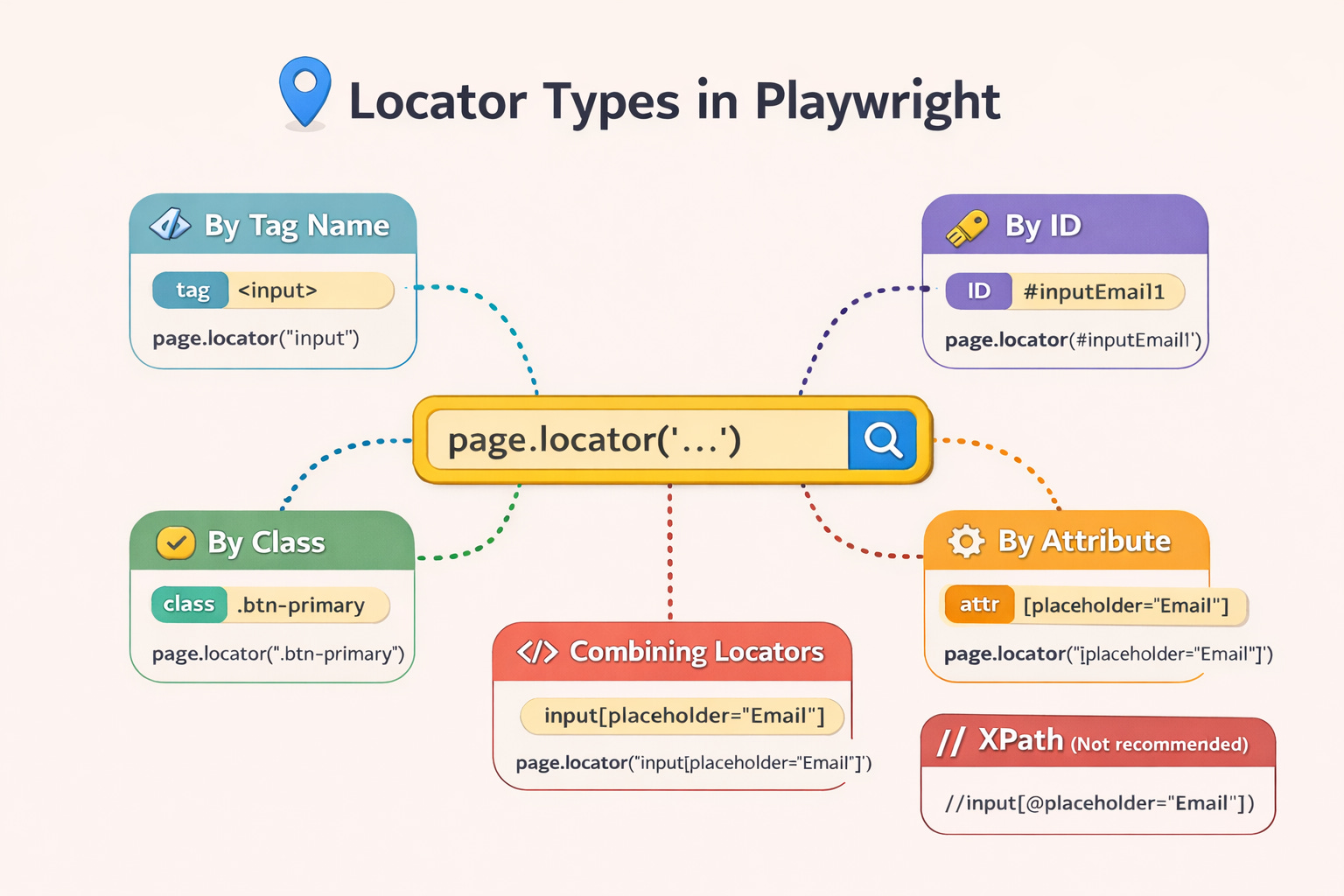
When learning Playwright, one of the first things you realize is that finding elements correctly is everything.
If your locator is weak or ambiguous, your tests will fail.
If your locator is precise and well-designed, your automation becomes stable, readable, and maintainable.
In this article, I want to walk through the basic locator syntax rules in Playwright — the foundation every QA engineer should understand before writing complex automation.
Let’s look at a simple test example.
test('locator syntax rules', async({page}) =>{

    // by Tag name
    page.locator('input')

    // by ID (# indicates the locator is an ID)
    page.locator('#inputEmail1')

    // by class value ( "." indicates class )
    page.locator('.shape-rectangle')

    // by attribute ([] indicates attribute)
    page.locator('[placeholder="Email"]')

    // by entire class value (full class selector)
    page.locator('[class="input-full-width size-medium status-basic shape-rectangle nb-transition"]')

    // combining selectors (tag + attribute)
    page.locator('input[placeholder="Email"]')

})
Now let’s break down what each of these selectors means.
1. Locating Elements by Tag Name
The simplest selector is the HTML tag itself.
page.locator('input')This finds all <input> elements on the page.
However, this approach is usually too broad. Most pages have many input fields, so relying only on the tag name can make your locator unstable.
It’s useful for quick exploration, but rarely ideal for production tests.
2. Locating by ID
IDs are often the most reliable selectors.
page.locator('#inputEmail1')The # symbol tells Playwright that you're targeting an element ID.
Example HTML:
<input id="inputEmail1">If the ID is unique (as it should be), this locator becomes very precise.
3. Locating by Class
You can target elements using their CSS class.
page.locator('.shape-rectangle')The . symbol represents a class selector.
Example HTML:
<input class="shape-rectangle">This works well, but remember: many elements can share the same class, so sometimes this selector is not unique enough.
4. Locating by Attribute
Another powerful technique is using HTML attributes.
page.locator('[placeholder="Email"]')Example HTML:
<input placeholder="Email">The square brackets [ ] indicate that we are selecting by attribute value.
This method is extremely useful because attributes like:
placeholdertypedata-testidaria-label
are often very stable.
5. Using the Full Class Attribute
Sometimes you may see selectors like this:
page.locator('[class="input-full-width size-medium status-basic shape-rectangle nb-transition"]')This targets the entire class attribute value.
While it works, it’s usually not recommended, because UI frameworks frequently change class combinations. Even a small change can break your locator.
A better approach is selecting only a relevant class.
6. Combining Selectors (The Powerful Technique)
One of the best practices in Playwright is combining selectors.
Example:
page.locator('input[placeholder="Email"]')This means:
find an input tag
that also has placeholder=”Email”
Combining selectors helps create unique and stable locators.
This is extremely powerful because it reduces the chance of selecting the wrong element.
7. What About XPath Locators?
If you come from Selenium or older automation projects, you might be used to XPath, like:
page.locator('//input[@placeholder="Email"]')XPath can work — but Playwright’s documentation recommends avoiding XPath when you can, because it often leads to:
Brittle tests (UI structure changes → XPath breaks)
Hard-to-read selectors (especially long XPaths)
More maintenance over time
A better approach than XPath
Instead of relying on the DOM tree structure, prefer CSS selectors and meaningful attributes, or even better, user-facing locators like role-based selectors:
// CSS: simple and stable
page.locator('input[placeholder="Email"]')

// Better (when possible): role-based, closer to how a user interacts
page.getByRole('textbox', { name: 'Email' })
When XPath is “acceptable.”
Sometimes XPath is the only option — especially in legacy apps with no stable attributes. If you must use it, keep it:
short
specific
and avoid absolute paths like
/html/body/div/...
But in modern Playwright-style automation, XPath should be the last resort, not the default.
A Practical Tip for QA Engineers
In real projects, I try to follow a simple rule:
Start with the most meaningful selector possible.
Good options include:
getByRole()(best for accessibility)data-testidunique IDs
attribute combinations
Weak selectors like tag name alone should usually be avoided.
8. Locating Elements by Exact Text
Sometimes the easiest way to locate an element is simply by the visible text the user sees on the page.
Example:
page.locator(':text-is("Using the Grid")')This finds an element whose visible text is exactly "Using the Grid".
Example HTML:
<button>"Using the Grid"</button>This approach is powerful because it matches what the user actually sees, rather than relying on technical attributes that may change.
In modern Playwright testing, text-based selectors are often preferred because they reflect real user interactions.
9. Locating Elements by Partial Text
You can also locate elements using partial text matches.
Example:
page.locator(':text("Using")')This would match elements such as:
Using the Grid
Using tag
Using settings
Partial text matching is helpful when:
The full text may change slightly
The UI contains dynamic content
You only need part of the label
However, be careful: partial matches can sometimes return multiple elements, so make sure the locator is still unique.
Why Locator Quality Matters
Good locators lead to:
✔ More stable tests
✔ Easier debugging
✔ Cleaner automation code
✔ Less maintenance when the UI changes
Poor locators lead to the opposite: flaky tests that waste hours of investigation.
Final Thought
Learning automation is not only about writing scripts.
It’s about learning how the browser sees the page.
Once you understand locator strategies, your Playwright tests become simpler, stronger, and much easier to maintain.
And in QA automation, that makes all the difference.
If you’re learning Playwright like I am, remember:
Small details like locator strategy often separate fragile test scripts from professional-level automation.